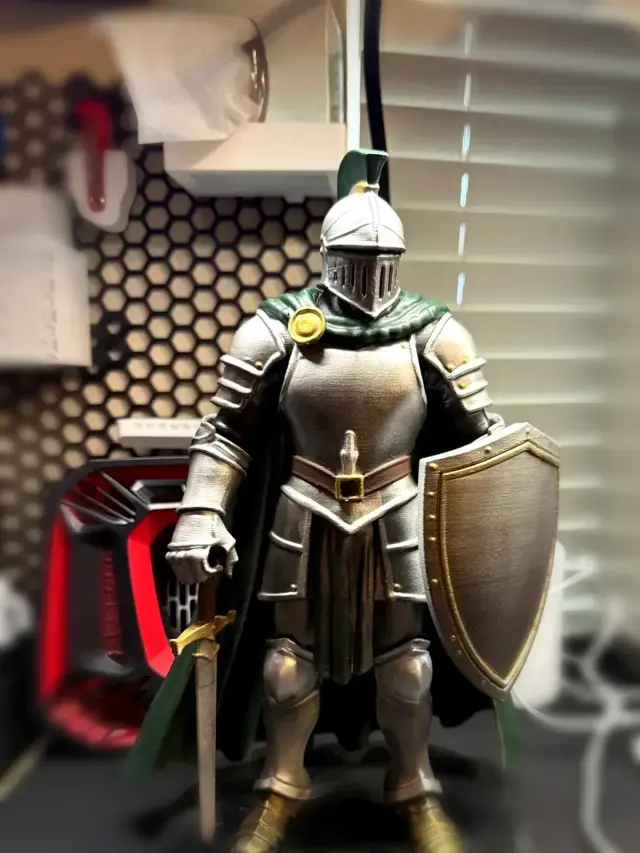
Knight Mascot Statue with Display Base
An armored knight with a sword, shield, cape, and plumed helmet, plus a separate stepped display base. Mini Makers 3D designed it as a school mascot for a class reunion.
You do not need a portfolio. You need one clear idea, a tool you are allowed to sell from, a cleanup, and one honest test print. This is the path Mini Makers 3D uses: design it, print it, photograph the real object, and publish the file.
A school mascot. A gift for a dog person. A hook that fits a specific shelf. If the sentence names a movie character or a brand, pick a different idea. Marvel and Disney are the famous traps. They are not the only ones.
AI path.  Tripo is the tool this shop used. Type your own idea, or upload a photo you have the rights to. The free plan is for practice. Free-plan models are non-commercial, so move to a paid plan before you sell. Can I sell prints of AI-made models? covers Meshy, Hi3D, Luma, and Hyper3D too.
CAD path. For a simple useful part, start in  Tinkercad. It is free, and a part you model yourself is yours.
  Shapr3D is the next step if you want an app that feels like real CAD. Skip selling anything you designed in
  Fusion’s personal plan or on
  Onshape’s free plan. Both of those free plans are non-commercial.
An AI mesh is a start, not a product. Before you slice, check four things:
 Blender is free if the generator’s own editor is not enough. You are fixing a shape, not chasing perfect topology.
Slice in the software that came with your printer. Print one. Look at it in your hand. If a part snaps, change the model. A slicer setting will not thicken a sword that was modeled as a ribbon. Photograph this print. Those photos are what you sell from.
List the physical object where you already sell, and put the file on MakerWorld if you want to give the file away the way this shop does. Your own design does not need someone else’s merchant license. A file you downloaded from another designer still does. How merchant licenses work covers that case. How much to charge covers the price. Our prints are the two examples below.
Both models started as a sentence. The knight is a school mascot for a class reunion. The Lab is a gift, and it also works as a pet memorial. Mini Makers 3D made the models in Tripo, cleaned them up enough to print, and published the files. Selling prints of a Tripo model needs a paid plan. This page does not say which plan these two used.
These are original designs from our shop. We made them in Tripo, printed them, and published the files free on MakerWorld.
An armored knight with a sword, shield, cape, and plumed helmet, plus a separate stepped display base. Mini Makers 3D designed it as a school mascot for a class reunion.
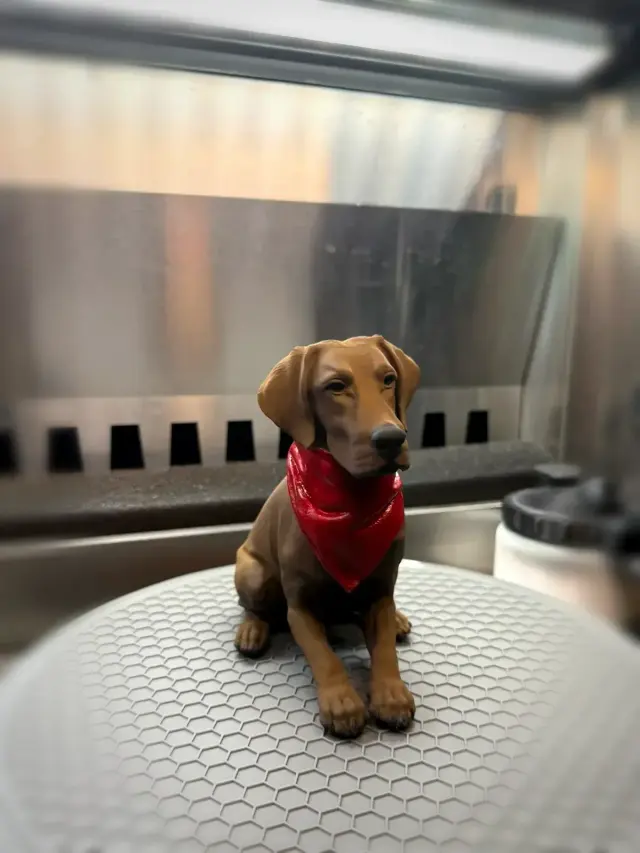
A seated chocolate Labrador in a red bandana. Mini Makers 3D modeled it as a gift. It works as a desk piece or a pet memorial.
Knight Mascot Statue with Display Base: About 265 mm tall. Display base about 189 mm wide. Printed on a Bambu Lab H2S, then airbrush-painted.
Chocolate Lab with Bandana: About 148 mm tall. PLA on a Bambu Lab P2S, then hand-painted.
The files are free on MakerWorld: Knight Mascot Statue with Display Base and Chocolate Lab with Bandana. The painted photos are the listing. The unpainted photos show they came off a printer, not out of a render.
Not from the free plans named on this page. Tripo's free plan is non-commercial, and Fusion's personal plan and Onshape's free plan are non-commercial. Move to a plan that allows commercial use before you sell.
One clear idea that is not someone else's character, a tool you are allowed to sell from, a cleanup, and one test print. That is the path Mini Makers 3D uses.